Adding preparation guidelines to orders
Preparation guidelines are instructions given to despatchers to help communicate specific requirements for an order such as fragile handling, gift wrapping, or custom packaging.
Last updated 9 days ago
To add preparation guidelines you’ll need to open your order from the Order List by searching or filtering results.
Not sure how to find your order? Revisit our support article here.
Adding preparation guidelines
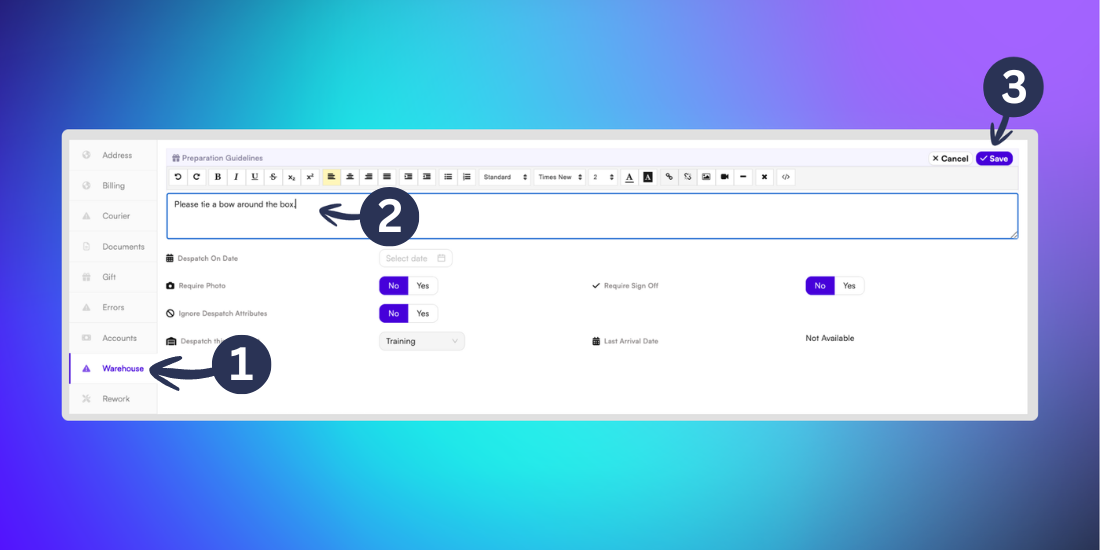
Once you’ve opened the order, select the Warehouse tab from the left menu.
Next to the Preparation Guidelines textbox click the Edit button. Type your guidelines into the textbox
Click Save to confirm the changes.
Caution: Preparation guidelines can only be added before an order is picked.