Adding product instructions
Product instructions help warehouse operatives to pick and pack products correctly by providing specific guidelines such as if an item is fragile and requires special handling.
Last updated 3 days ago
To add product instructions you’ll need to open your product from the Product List by searching or filtering results.
Not sure how to find your product? Revisit our support article here
Adding product instructions
Once you’ve opened your product, go to the Details page.
For despatch instructions click the Despatch tab from the left menu. For picking instructions click the Picking tab.
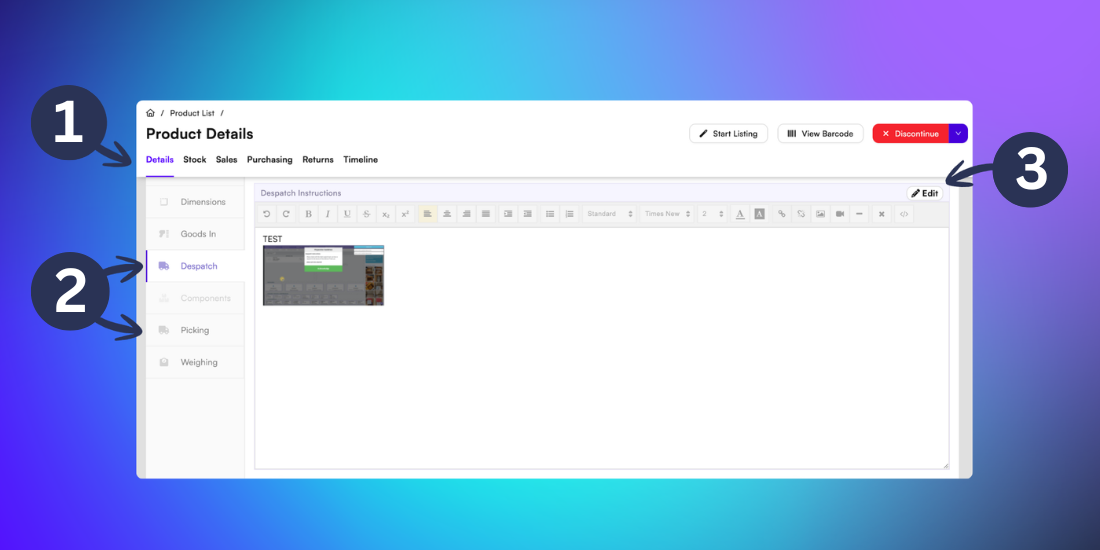
To update the product instructions, click Edit. You will now be able to add your specific product instructions. Pictures and links may also be included.
Click Save to confirm the changes.
Caution: There is a 25 character limit for instructions to display during picking. There is no limit for instructions to display during despatch.