Updating product customs information
It's important to keep customs information up to date so that international orders have accurate details for customs clearance. This page explains how to update Customs Descriptions, Country of Origin, Nominal Value and HS Codes.
Last updated 3 days ago
To update product customs information you’ll need to open your product from the Product List by searching or filtering results.
Not sure how to find your product? Revisit our support article here
Updating product customs information
Once you’ve opened your product, go to the Details page.
Then click the Customs tab from the left menu.
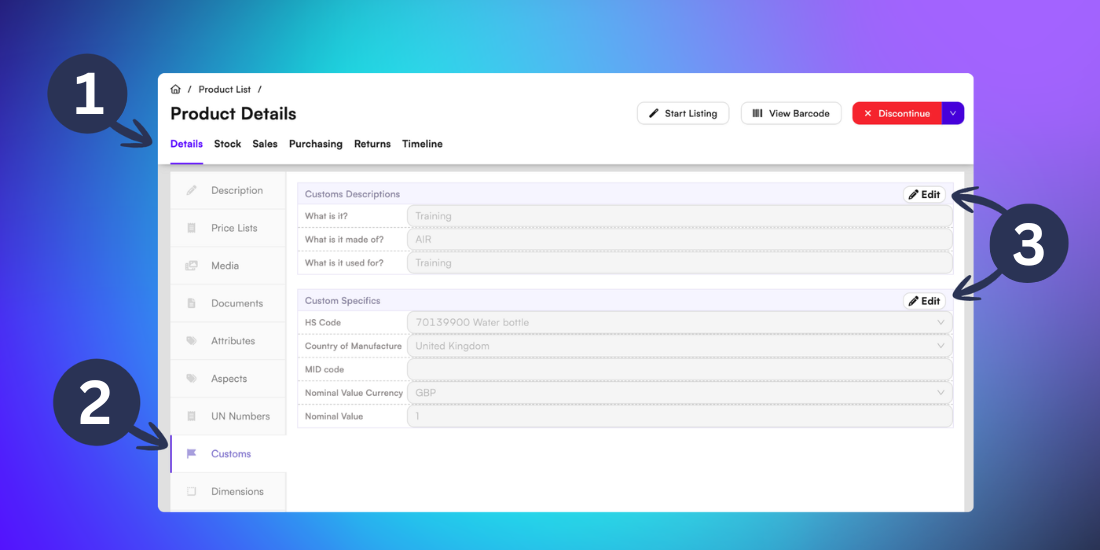
To update the customs information, click Edit on the relevant section and input the new value.
Click Save to confirm the changes.
For more guidance on HS codes, visit our support article here