Viewing shipments for a product
Shipments are goodsout orders that have been dispatched from the warehouse. Viewing shipments can be useful to see a list of all orders including a specific product for different product channels.
Last updated 3 days ago
To view a list of shipments for a product you’ll need to open your product from the Product List by searching or filtering results.
Not sure how to find your product? Revisit our support article here
Viewing product shipments
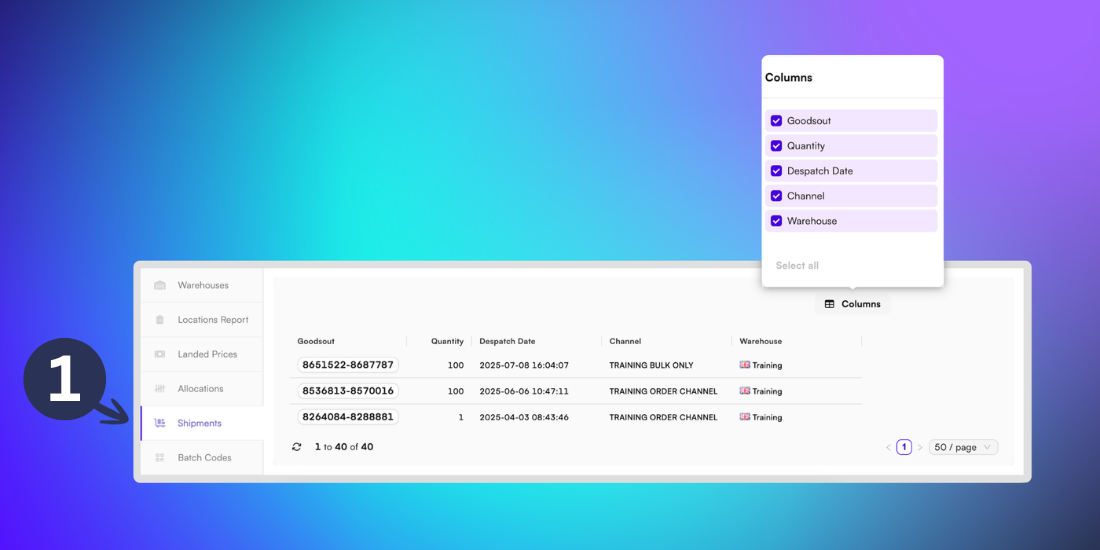
Once you’ve opened your product, go to the Stock page and open the Shipments tab from the left menu.
This page shows all completed orders containing the selected product, including the quantity of the item, despatch date and order channel.
Customise your view
You can customise the table by clicking the Columns button and selecting the boxes next to the fields you want to display. These include:
Goodsout - The order number for the goodsout containing the selected product. Click this link to access the Order Details page.
Quantity - The number of units for the order.
Dispatch date - The date and time that the order left the warehouse.
Channel - The sales or distribution pathway set up in BladePRO for this order.
Warehouse - The facility that the product unit is being stored in until dispatch.